Track changes to a vendor's terms, privacy policy, DPA or subprocessor list
Point PageDiff at the public URL of the vendor's terms, privacy policy, DPA or subprocessor page, then describe what counts as a change in plain English: a subprocessor being added, a processing location moving from Ireland to the US, a liability cap being reworded. PageDiff checks the page on your schedule, tells you in plain language what changed, scores how significant it is so cosmetic edits usually stay out of your inbox, and keeps a timestamped snapshot of every version.
Many vendor contracts oblige the vendor to tell you when their subprocessors change. In practice that notice is often an opt-in mailing list, a page you have to remember to revisit, or a feed nobody subscribed to, and the clock on your right to object starts running whether or not it reached the right person. Watching the page directly closes that gap, and it works the same way whether the vendor announces changes or not.
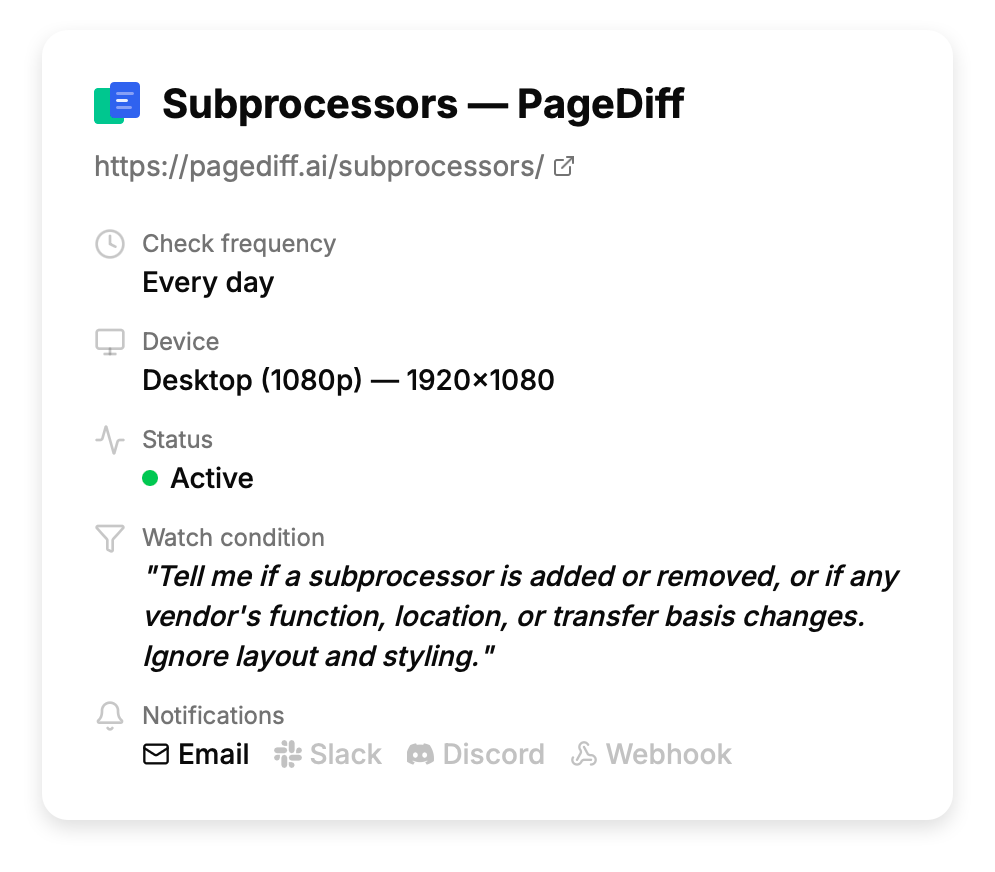
What you can watch
- Subprocessor lists The table of vendors your vendor uses. Where your agreement gives you a right to object, additions and removals are usually the changes that matter most, and they're the ones most likely to arrive without a notification.
- Data processing agreements (DPAs) Where the DPA is published as a web page rather than a signed PDF, changes to processing purposes, retention periods, transfer mechanisms and audit rights are all in scope.
- Privacy policies Both the substance and the housekeeping: a new category of collected data, a new international transfer, or a quietly bumped 'last updated' date with no changelog attached.
- Terms of service, MSAs and acceptable-use policies Liability caps, termination and renewal terms, price-change clauses, and usage restrictions that can turn a compliant integration into a non-compliant one.
- Security and compliance pages Certification status, audit dates and stated security controls, where the vendor publishes them as ordinary HTML rather than behind a trust portal.
- Status, SLA and incident-history pages Changes to the uptime commitment or the service-credit schedule, which tend to move quietly and matter at renewal.
What this won't cover
- Trust Center portals SafeBase, Vanta, Drata and similar portals render their content with JavaScript behind a gate, often behind a login or an NDA. Some vendors redirect their public legal URL straight into one; Vercel's subprocessor page does. Those aren't reachable, and we'd rather say so here than after you've signed up.
- PDF documents PageDiff monitors web pages, not PDFs. If a vendor publishes their DPA only as a PDF, we can watch the page that links to it and tell you when that link or its date changes, but not what moved inside the document.
- Pages behind a login or an NDA Checks run from the cloud, so PageDiff can only reach what's publicly reachable. A customer-portal copy of your agreement is out of reach; the public version of the same document usually isn't. A few vendors also refuse datacenter traffic outright, which shows up immediately as a failed check rather than a silent gap.
- A vendor's whole legal section at once Covering a vendor properly means their terms, privacy policy and subprocessor list each get a monitor, because a monitor is scoped to a single URL. Budget three or four per vendor you care about.
- Telling you whether a change matters legally PageDiff tells you precisely what changed and how significant the edit is. Whether a reworded indemnity clause is acceptable to your organisation is a judgement for your counsel; our job is making sure it reaches them.
Scope checked against the product in August 2026. Things change. If anything here is out of date, tell us and we'll correct it.
Why the vendor’s own notice isn’t enough
Many vendor DPAs contain a clause saying you’ll be told when subprocessors change, and give you a window in which to object. The clause is real. The operational reality behind it usually isn’t.
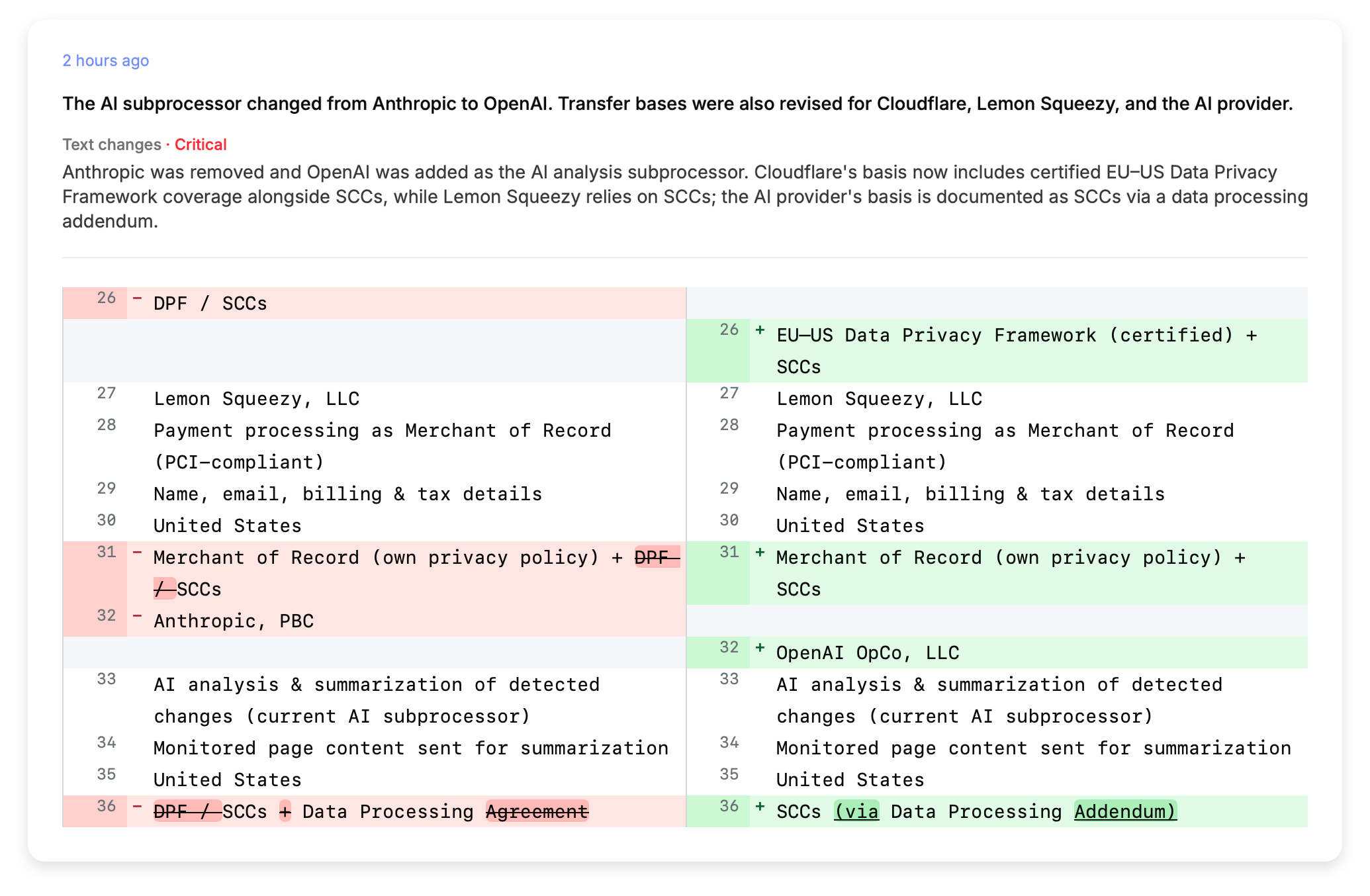
The notice goes to a mailing list somebody subscribed to during procurement two years ago, or to a shared inbox nobody owns. Some vendors treat publishing the updated page as the notice, which is defensible and not much use to you. Meanwhile the objection window is running.
The manual alternative is a calendar reminder to re-read a dozen legal pages each quarter. Small row-level changes are easy to miss when you’re comparing long pages months apart, and a new vendor row is exactly that kind of change.
Setting one up
It’s three fields and about a minute per page.
- Paste the URL. You get a live capture straight away, so you find out immediately whether the page is reachable. A vendor hiding behind a portal or blocking automated traffic shows up here, before you’ve committed anything.
- Say what counts as a change. In plain English, in the box. PageDiff reads the page and suggests conditions to start from, so you can pick one and adjust it. You’re describing the outcome you want to hear about, not writing a CSS selector that breaks at the next redesign.
- Choose the schedule and the channels. Hourly is generous for a legal page; the floor is 15 minutes on Pro and 5 on Business. Alerts go to email, with up to five people cc’d, or to Slack, Discord, or a signed webhook.
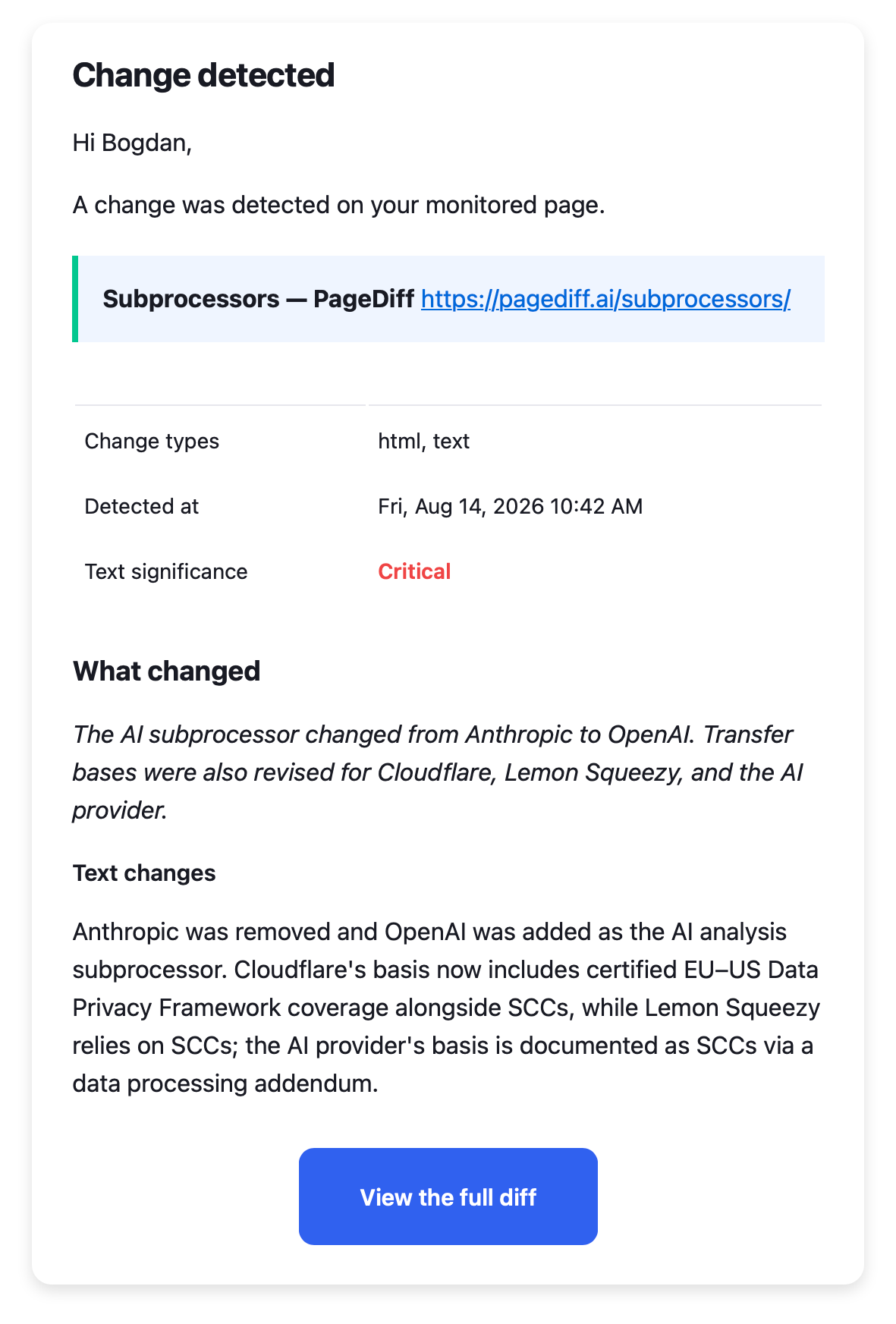
What lands in your inbox
A short summary of what changed, a significance score, and text and visual diffs if you want to see it in place. The snapshot and saved HTML stay retrievable afterwards, which is what turns an alert into a record.
Two things decide whether a change reaches you, and they run in that order:
Page changed → does it match your watch condition? → is it significant enough? → alert.
With a condition set, a change has to clear both. With no condition, the significance score decides on its own. Either way it keeps most of the churn out: legal pages carry a rotating banner, a reworded cookie notice, a date stamp that increments on republish, and that kind of edit is typically scored below the threshold.
You can also scope the condition to part of the page. On a document with separate subprocessor, service-provider and affiliate tables, “tell me when the subprocessors list changes, ignore the affiliates list” is a condition you can state directly. That scoping does real work on long pages, and it’s worth checking on a vendor you know well before you rely on it for one you don’t.
From published change to reviewable record
The alert is the start of the process, not the end of it. The part that matters to a compliance or procurement team is what survives afterwards.
- The vendor publishes. Often with no announcement, and often the page itself is the notice.
- The next check picks it up, and the timestamp is ours rather than theirs. It records when we first observed the changed version, not the moment the vendor published it, so on an hourly schedule the change may have gone up an hour before we saw it.
- It reaches whoever owns the vendor. Up to five people on email, or a Slack channel, or a signed webhook into your own system. Ownership is usually the failure point here, so route it once at setup rather than forwarding it each time.
- Your team decides whether to act. We do not track the objection window, assign the review or tell you whether the change is acceptable. That is your process, and the diff is what it runs on.
What you can show later is the pair of snapshots and the saved HTML, timestamped, with the summary of what moved between them. Not an alert you have to remember receiving, but what the page said before and after.
Which pages are worth a monitor
Three or four monitors covers a vendor thoroughly:
- The subprocessor list. Usually the one that changes most, and the one with a contractual clock attached to it.
- The DPA, where it’s published as a web page rather than a signed PDF. Transfer mechanisms and retention terms are where the meaningful edits land.
- The privacy policy, if you’d have to update your own records when theirs changes.
- Terms of service, for the liability, termination and price-change clauses that matter at renewal rather than day to day.
On plans: at three or four monitors per vendor, Starter at $10/month and 10 monitors covers your two or three most critical relationships. History retention is the thing to weigh here rather than monitor count, since it sets how far back you can evidence a page: 30 days on Starter, 90 on Pro, 365 on Business. If a change has to be provable at audit rather than merely noticed, that is the number to look at.
We run this on ourselves
We publish our own subprocessor list, and we watch our vendors’ pages with PageDiff, including Cloudflare’s, who is one of ours. When our AI provider changed in August 2026, our own subprocessor page changed with it, and anyone monitoring us would have seen the row move.
We wrote this page because it’s a use case we actually depend on ourselves.
Try it on the page you have in mind
Paste a public URL to see the live capture and the watch conditions PageDiff suggests. No signup needed.