Get told when a vendor ships a breaking change, not every time they ship
Point PageDiff at the changelog, release notes or deprecation page, then describe what matters to you in plain English: a new API version, a breaking change, a deprecation notice. PageDiff checks the page on your schedule, reads what was added, and sends a summary naming the entries. Routine entries are usually scored low and held back, so a page that publishes several times a week can still be worth subscribing to.
Most vendors publish a changelog and most engineers stop reading it. The entries that matter, a version bump or a removed parameter, arrive in the same stream as copy edits, minor fixes and product announcements you have no stake in. Skimming it weekly means finding a breaking change after you shipped against it. Watching the page with a condition attached inverts that: nothing arrives until something you named arrives.
What you can watch
- Versioned API changelogs Stripe, Twilio, Shopify and anyone else who dates and names their releases. The version string itself is the signal, which makes these the easiest pages to write a precise condition against.
- Product changelogs and release notes GitHub, Cloudflare, Vercel and similar. High volume, many products in one stream, and usually the page where a condition naming the product you care about does the most work.
- Deprecation and sunset notices Where a vendor keeps a separate page for what's going away. Often the quietest page in a vendor's docs and the one with a date attached to it.
- Security advisories and WAF release notes Rule releases, CVE notes and advisory feeds published as ordinary pages. These tend to move on a schedule that doesn't suit a weekly skim.
- GitHub releases pages The public releases list for a dependency you pin. Useful when you want the release itself rather than every commit, and when the repo has no mailing list worth joining.
- Docs pages carrying a 'last updated' stamp A reference page that changes without an entry anywhere. The stamp moves, the content moves with it, and nothing announces either.
What this won't cover
- Entries published with a headline and nothing else Some changelogs list an entry as a bare title with no summary text on the index page. There's nothing for us to read, so a real announcement can score low and stay out of your inbox. We hit this once on GitHub's changelog during our own three-week run. If a vendor publishes this way, expect to open the page occasionally rather than to be told every time.
- Telling you whether a change affects your integration We can tell you a parameter was removed and quote the entry that says so. Whether your code calls it is a question about your codebase, and answering it is your work, not ours.
- Changelogs behind a login or inside the product Checks run from the cloud and reach what's publicly reachable. An in-app 'what's new' panel or a customer-portal release note is out of reach. The public version of the same page usually isn't.
- Release notes published only as PDFs PageDiff monitors web pages. We can watch the page that links to the PDF and tell you when that link or its date changes, but not what moved inside the document.
- A vendor's whole documentation set Vendors who publish a separate changelog per service need one monitor per service. That is usually a good thing here, since it lets you watch the two services you run and skip the forty you don't, but it does mean the platform-wide page and the per-service pages are different subscriptions.
- Following the link to read the full entry We diff the page you gave us. If the index carries a summary, that's what we read. If the detail lives one click away on its own page, watch that page too, or accept that the index is all you'll see.
Scope checked against the product in September 2026. Things change. If anything here is out of date, tell us and we'll correct it.
Why not just subscribe?
It’s the fair question, and for some vendors a feed is genuinely enough. The difference shows up when you care about a fraction of what they publish.
| Subscribing to the vendor | Watching the page |
|---|---|
| Every entry they publish | The entries matching what you described |
| Their categories, where they offer any | Your own condition, in plain English |
| Only where a feed or list exists | Any public page, feed or no feed |
| Lives in your inbox until you delete it | Timestamped snapshot of every version |
A versioned API changelog carries release notes, product announcements, minor fixes and copy edits in one list. Cloudflare’s covers dozens of products, most of which you don’t run. Subscribing gets you all of it, so the filtering moves to you and usually stops happening. Skimming weekly finds the entry that mattered seven days late.
The vendor isn’t doing anything wrong. A changelog is written for every reader at once, and no vendor can know you pin one SDK and ignore the rest of the platform.
Setting one up
Three fields, about a minute.
- Paste the changelog URL. You get a live capture immediately, so you find out there and then whether the page is reachable and whether the entries are actually in it.
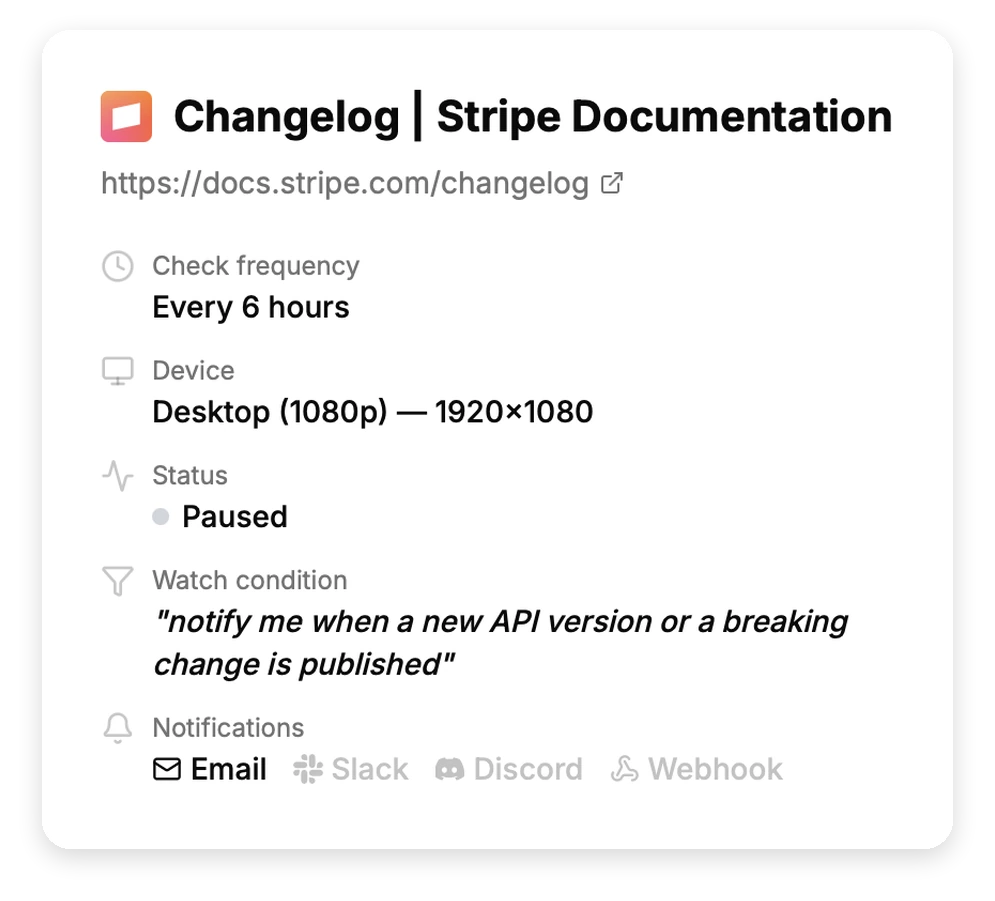
- Say what you want to hear about. In plain English. “Notify me when a new API version or a breaking change is published” is a real condition from a monitor we run. PageDiff reads the page and suggests conditions to start from, so you can pick one and edit it.
- Choose the schedule and the channels. Hourly suits most changelogs. The floor is 15 minutes on Pro and 5 on Business. Alerts go to email with up to five people cc’d, or to Slack, Discord, or a signed webhook.
What lands in your inbox
A summary naming the entries that were added, a significance score, and text and visual diffs if you want to see them in place.
Two things decide whether a change reaches you, and they run in that order:
Page changed → does it match your watch condition? → is it significant enough? → alert.
With a condition set, a change has to clear both. With no condition, the significance score decides on its own. That second stage is what makes a busy page liveable. Changelog sites carry churn that has nothing to do with the entries: filter controls, category chips, cookie notices, a footer that moves on its own. Every change is scored and only what clears your threshold is delivered.
Worth being clear about what the score can and can’t do. It reads what’s on the page. When a vendor lists an entry as a bare headline with no summary, there’s little to read and a real announcement can score low. That happened once to us in three weeks. It’s the reason we don’t claim you’ll never need to open the page again.
What three weeks of running this looked like
We validated this use case before writing the page, on three real changelogs, and kept the log.
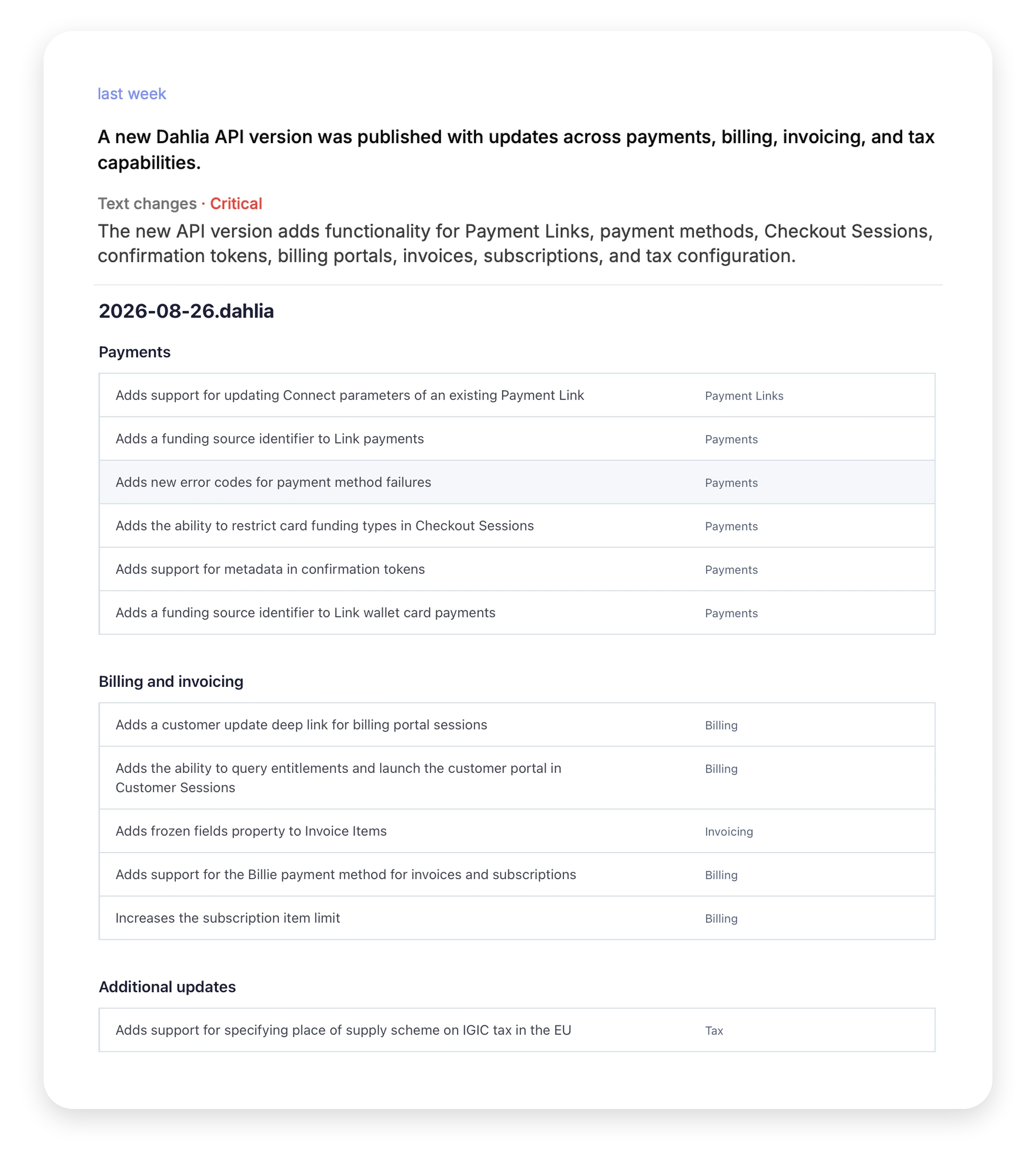
Stripe’s changelog. Condition: new API version or breaking change. It reported nothing for eleven days, because Stripe publishes roughly monthly. On 27 August it caught the 2026-08-26.dahlia release the day after it went up, including the preview version carrying the breaking changes.
GitHub’s changelog. Condition naming feature announcements, on a page that publishes most days inside a marketing site whose furniture moves independently. Seven announcements came through. The site’s own navigation and footer churn scored low and stayed out. One entry was missed, published as a headline with no summary text, which is the limitation described above.
Cloudflare’s changelog. No condition at all, watching everything, as the deliberate worst case. Three alerts in four days. Every one was a genuine batch of entries. A busy changelog with no filter turned out not to be a firehose.
Which pages are worth a monitor
Start with the pages that carry a clock:
- The API changelog for anything you version against.
- The deprecation or sunset page, if the vendor keeps one separately. It’s usually quiet, and quiet pages are where a monitor earns the most.
- Per-service changelogs for the two or three services you actually run, rather than the platform-wide stream.
- The releases page for a pinned dependency with no mailing list.
On plans: Starter at $10/month gives you 10 monitors and hourly checks, which covers the vendors most teams depend on. Pro at $30 raises that to 50 monitors and 15-minute checks, and is the right step once you’re watching per-service changelogs rather than platform-wide ones. Nothing here needs a higher tier for the features, only for the scale.
Try it on the page you have in mind
Paste a public URL to see the live capture and the watch conditions PageDiff suggests. No signup needed.